
Shared Services
Shared services are database and infrastructure containers (Postgres, Redis, MongoDB, etc.) that run on your host Docker daemon rather than inside a Coast. Coast instances connect to them over a bridge network, so every Coast talks to the same service on the same host volume.
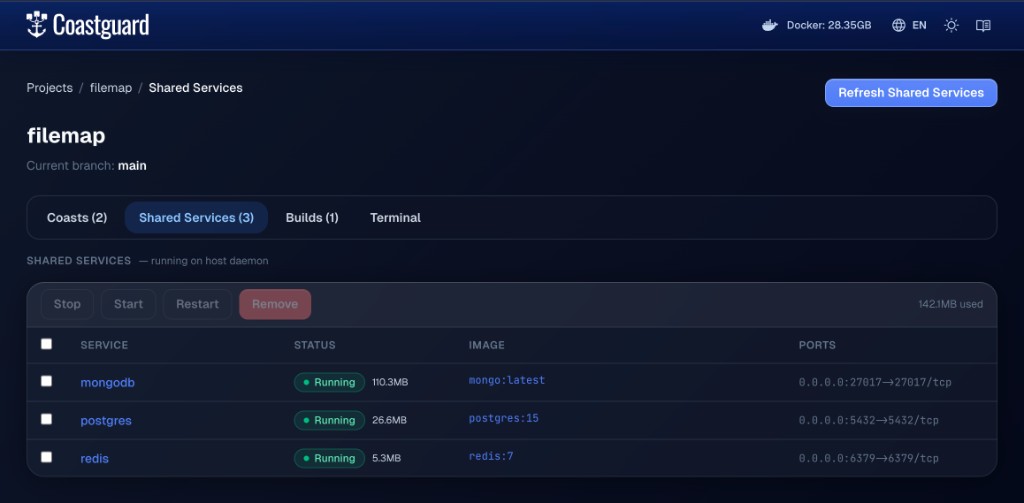 The Coastguard shared services tab showing host-managed Postgres, Redis, and MongoDB.
How They Work
When you declare a shared service in your Coastfile, Coast starts it on the host daemon and removes it from the compose stack that runs inside each Coast container. Coasts are then configured to route service-name traffic back to the shared container while preserving the service's container-side port inside the Coast.
Host Docker daemon
  |
  +--> postgres (host volume: infra_postgres_data)
  +--> redis    (host volume: infra_redis_data)
  +--> mongodb  (host volume: infra_mongodb_data)
  |
  +--> Coast: dev-1  --bridge network--> host postgres, redis, mongodb
  +--> Coast: dev-2  --bridge network--> host postgres, redis, mongodb
Because shared services reuse your existing host volumes, any data you already have from running docker-compose up locally is immediately available to your Coasts.
This distinction matters when you use mapped ports:
[shared_services.postgis]
image = "ghcr.io/baosystems/postgis:12-3.3"
ports = ["5433:5432"]- On the host, the shared service is published on
localhost:5433. - Inside every Coast, app containers still connect to
postgis:5432. - A bare integer like
5432is shorthand for the identity mapping"5432:5432".
When to Use Shared Services
- Your project has MCP integrations that connect to a local database — shared services let those continue to work without dynamic port discovery. If you publish the shared service on the same host port your tools already use (for example
ports = [5432]), those tools keep working unchanged. If you publish it on a different host port (for example"5433:5432"), host-side tools should use that host port while Coasts continue using the container port. - You want lighter Coast instances since they do not need to run their own database containers.
- You do not need data isolation between Coast instances (every instance sees the same data).
- You are running coding agents on the host (see Filesystem) and want them to access database state without routing through
coast exec. With shared services, the agent's existing database tools and MCPs work unchanged.
See the Volume Topology page for alternatives when you do need isolation.
Volume Disambiguation Warning
Docker volume names are not always globally unique. If you run docker-compose up from multiple different projects, the host volumes that Coast attaches to shared services may not be the ones you expect.
Before starting Coasts with shared services, make sure the last docker-compose up you ran was from the project you intend to use with Coasts. This ensures the host volumes match what your Coastfile expects.
Troubleshooting
If your shared services appear to be pointing at the wrong host volume:
- Open the Coastguard UI (
coast ui). - Navigate to the Shared Services tab.
- Select the affected services and click Remove.
- Click Refresh Shared Services to recreate them from your current Coastfile configuration.
This tears down and recreates the shared service containers, reattaching them to the correct host volumes.
Shared Services and Remote Coasts
When running remote coasts, shared services still run on your local machine. The daemon establishes SSH reverse tunnels (ssh -R) so the remote DinD containers can reach them via host.docker.internal. This keeps your local database shared with remote instances. The remote host's sshd must have GatewayPorts clientspecified enabled for the reverse tunnels to bind correctly.